XPRESS Solver Engine - Linear Programming Options
Linear Programming Options
LP Options Tab
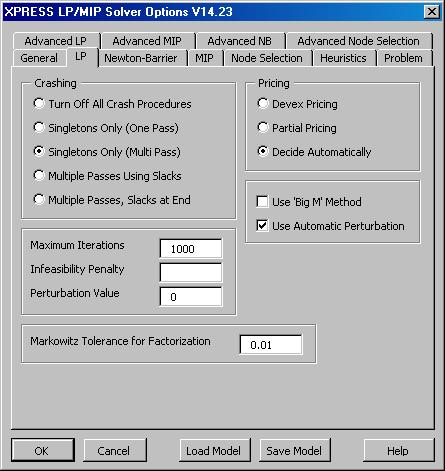
| The XPRESS Solver Options dialog LP tab allows you to set basic options for the primal and dual Simplex method.
On this tab, you can select a Crashing option to create an initial basis that is as close to feasibility and triangularity as possible; select Pricing options to control how a variable is chosen to enter the basis; select the Big M Method instead of the traditional Simplex Phase I method; and allow Automatic Perturbation of the problem to escape from degeneracy. You can also set the Maximum Iterations limit and other tolerances here.
|

XPRESS Solver Options
dialog LP tab |
Advanced LP Options Tab
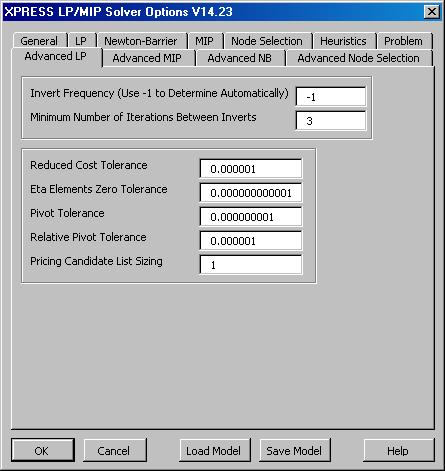
| The XPRESS Solver Options dialog Advanced LP tab allows you to set advanced options that control the primal and dual Simplex method. The default values are appropriate for most problems, but these options can be adjusted by advanced users.
On this tab, you can set the LP Matrix Invert Frequency, the size of the Pricing Candidate List used in partial pricing, the absolute and relative Pivot Tolerance, the Reduced Cost Tolerance, and the zero tolerance for Eta Elements that premultiply the basis inverse.
|

Click on the XPRESS Solver Options
dialog Advanced LP tab to see it full size. |
Next: Newton Barrier (Interior Point) User Options >
< Back to XPRESS Solver Engine Product Overview