|
|
|
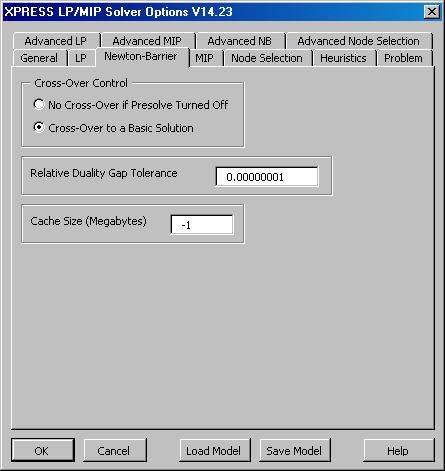
Newton Barrier Options Tab
The XPRESS Solver Options dialog
Newton Barrier tab allows you to set basic options for the primal and dual
Simplex method.
On this tab, you can determine whether the Newton Barrier
method will Cross Over to the Simplex method near the
solution, so that sensitivity analysis information can be
obtained. You can set the Relative Gap Duality
Tolerance, the most common stopping tolerance for the
Barrier method. And you can specify the processor Cache
Size, or let the XPRESS Solver determine it automatically,
to improve performance on intensive linear algebra
computations. |

Click on the XPRESS Solver Options
dialog Newton Barrier tab to see it full size.
|
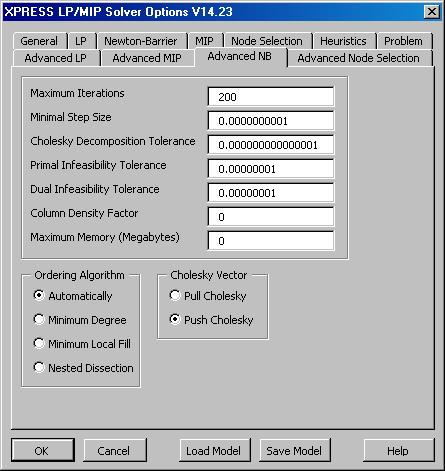
Advanced Newton Barrier Options Tab
The XPRESS Solver Options dialog
Advanced Newton Barrier tab allows you to set advanced options
that control the Newton Barrier method. The default
values are appropriate for most problems, but these options
can be adjusted by advanced users.
On this tab, you can control Problem to Solve, the Maximum
Memory used and the column ordering in the Cholesky
factorization of the normal equations matrix, the primal
and dual feasibility tolerance, the maximum
iterations and minimal step size for the Barrier
method before the Solver stops, and other factors governing
the Newton Barrier method. |

Click on the XPRESS Solver Options
dialog Advanced NB tab to see it full size.
|
Next: Mixed-Integer
Programming User Options
Back to XPRESS Solver Engine Product
Overview
|