|
|
|
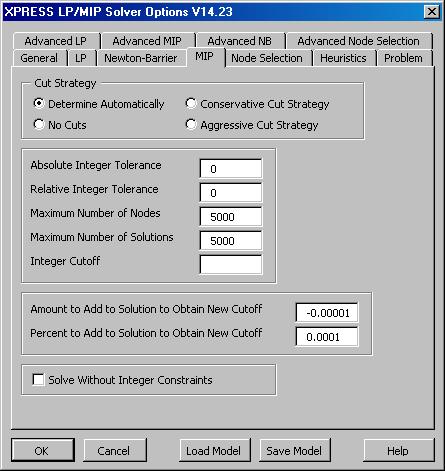
MIP Options Tab
The XPRESS Solver Options dialog
MIP tab allows you to set basic options for the Branch and Cut
method.
On this tab, you can select a conservative, aggressive, or
automatically determined Cut Strategy, or you can
disable generation of cuts. You can set absolute and
relative Integer Tolerances and related parameters
which determine how close the Solver must come to an integer
optimal solution before stopping. And you can solve the relaxation
of the MIP problem, temporarily ignoring the integer
constraints. |

Click on the XPRESS Solver Options
dialog MIP tab to see it full size.
|
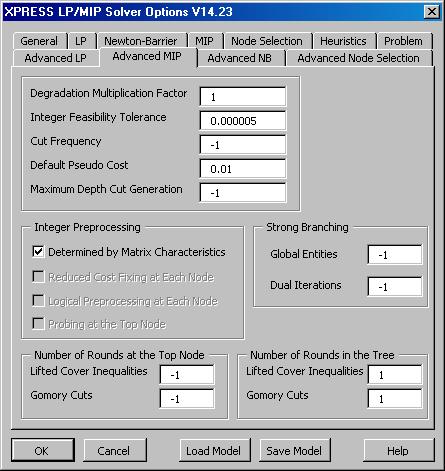
Advanced MIP Options Tab
The XPRESS Solver Options dialog
Advanced MIP tab allows you to set advanced options that
control the Branch and Cut method. The default values
are often useful, but may be changed for specific problems to
improve performance.
On this tab, you can control the use of Integer
Preprocessing strategies at each node, the Cut
Frequency, Maximum Depth for cut generation, and
the Number of Rounds (times) that certain kinds of cuts
are generated at different nodes. You can also control
the computation of Pseudo Costs used to choose the best
integer variable to branch upon. |

Click on the XPRESS Solver Options
dialog Advanced MIP tab to see it full size.
|
Next: MIP Node Selection User Options
Back to XPRESS Solver Engine Product
Overview
|